
Quickstart
This guide provides an introduction to getting started with the Harbor API, including how to authenticate requests, create customers, link blockchain addresses or bank accounts, and make API calls with the required headers and parameters.
Introduction
This guide walks you through the same steps as Harbor Basics, from a developer's point of view: creating a Customer, onboarding them, and making your first transfer using the Harbor API.
In this example, you'll:
- Create an individual Customer.
- Take the Customer through onboarding.
- Make an off-ramp transfer, converting a stablecoin such as USDC into fiat currency and sending it to a bank account.
Throughout this guide, you'll create a Customer named John Morgan, based in the US. John then sends 100 USD to Sam Rivera in Mexico, paying with USDC on Ethereum. Harbor converts the USDC and pays out the USD to Sam's bank account by international wire.
Prerequisites
This example runs in the Sandbox environment, so no real funds are moved. Make sure you have:
- Access to the Harbor Portal.
- A Sandbox API key. If you don't have one yet, see Get API access.
All requests use the Sandbox base URL, https://harbor-sandbox.owlpay.com, and must include your API key in the X-API-KEY header.
For testing and coding along, we recommend using Postman.
Customers
When creating a Customer object, create one for each individual or business you will make transfers for. Set the type field to either individual or business.
Creating a customer
In this example, we’ll create an individual Customer named John Morgan.
curl --location --request POST 'https://harbor-sandbox.owlpay.com/api/v1/customers' \
--header 'Content-Type: application/json' \
--header 'Accept: application/json' \
--header 'X-API-KEY: {{API_KEY}}' \
--header 'X-Idempotency-Key: {{Idempotency-Key}}' \
--data-raw '{
  "type": "individual",
  "first_name": "John",
  "last_name": "Morgan",
  "email": "[email protected]",
  "phone_country_code": "US",
  "phone_number": "555-555-1234",
  "birth_date": "1988-04-15",
  "description": "A freelance writer who loves exploring national parks."
}'
The endpoint returns the newly created Customer. These fields matter for the next steps:
{
    "data": {
        "uuid": "cus_enu6FPVOadvDMKDMOoRKtbPWQAcxEuOPDvYe8r8K",
        "object": "customer",
        "status": "unfinished",
        "state": "not_started",
        "type": "individual",
        "first_name": "John",
        "middle_name": null,
        "last_name": "Morgan",
        "email": "[email protected]",
        "phone_country_code": "US",
        "phone_number": "555-555-1234",
        "birth_date": "1988-04-15",
        "is_bank_account_linkable": false,
        "is_card_linkable": false,
        "description": "A freelance writer who loves exploring national parks.",
        "intermediary_fi_reference": null,
        "created_at": "2025-05-22T07:26:12+00:00",
        "updated_at": "2025-05-22T07:26:12+00:00",
        "has_signed_agreement": false,
        "agreement_link": "https://harbor-sandbox.owlpay.com/agreements?uuid=agt_vLH2kDK7a4NnktmcXa3bSEeVKkIMNRp1IFJo1bEu",
        "verification_link": "https://harbor-sandbox.owlpay.com/gokyc?expires=1791176732&hash=f6dc4877bf7da7dc33874de39e49ff97e6485dd6dd0bdb221635de9b25143567",
        "rfi_link": null
    }
}uuid: the Customer's unique ID. It starts withcus_, the prefix for Customer objects. Every Harbor object ID starts with a prefix for its type, such astransfer_for transfers.agreement_link: the link the Customer uses to accept Harbor's service agreement (Onboarding, Step 1).verification_link: the link the Customer uses to submit their verification information (Onboarding, Step 2).
Save the Customer's uuid from the response. You'll pass it in later requests for this Customer.
Note that status is unfinished: the Customer can't transact until onboarding is complete.
Onboarding
Before you can create transfers for a Customer, the Customer must complete Onboarding. Onboarding has two main steps, and the Customer response above already includes the link for each.
Step 1: Accept the agreement
Send the Customer the agreement_link from the response so they can review and accept the service agreement. The has_signed_agreement field shows whether they have accepted it.
onboarding-page-example
Step 2: Provide information
Next, send the Customer the verification_link. The Customer uses it to submit the information Harbor needs for KYC (individuals) or KYB (businesses) verification.
Can I submit customer information through the API?
Yes. Instead of the hosted verification_link form, you can submit the Customer's information through the Harbor API. See Onboard via API.
After the Customer submits their information, Harbor reviews it and updates the Customer's status. The diagram below shows the possible status changes.
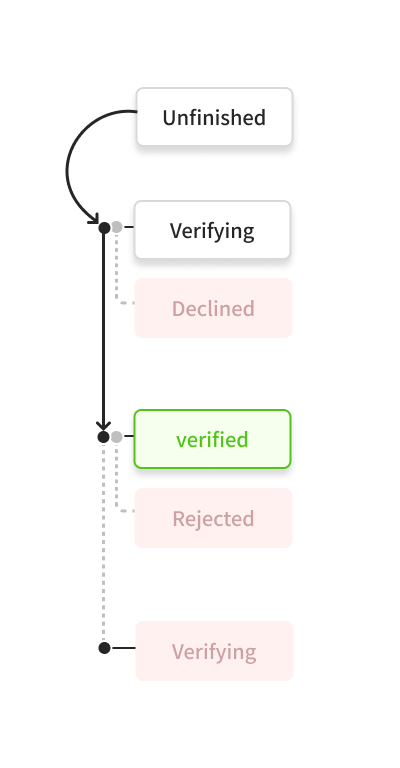
Customer KYC status change diagram
For a detailed explanation of each status, see Status Definitions.
Sandbox vs. Production
- In Sandbox, onboarding is approved automatically, usually within 1–2 minutes.
- In Production, Harbor reviews each submission, which can take 1–2 business days.
Transfers
Once the Customer is verified, you can create transfers for them. A transfer can be an on-ramp (fiat to stablecoin), an off-ramp (stablecoin to fiat), or an on-chain transfer (stablecoin to stablecoin).
Each transfer takes three API calls.
Step 1: Create a quote
Request a quote with the source, the destination, and the commission for the transfer. The response includes a quote_id. See Quotes.
In this example, we'll request a quote for an off-ramp from USDC on Ethereum to 100 USD in Mexico, with a fixed commission of 5.
curl --location --request POST 'https://harbor-sandbox.owlpay.com/api/v2/transfers/quotes' \
--header 'Content-Type: application/json' \
--header 'Accept: application/json' \
--header 'X-API-KEY: {{API_KEY}}' \
--header 'X-Idempotency-Key: {{Idempotency-Key}}' \
--data-raw '{
    "source": {
        "type": "individual",
        "country": "US",
        "chain": "ethereum",
        "asset": "USDC"
    },
    "destination": {
        "type": "individual",
        "country": "MX",
        "asset": "USD",
        "amount": "100"
    },
    "commission": {
        "amount": 5,
        "percentage": 0
    }
}'
The endpoint returns a list of available quotes:
{
    "data": [
        {
            "id": "quote_uioUTmUbPzOxPkHvaHyC0jB0dsA7ocNrhqnIHYQv",
            "payment_method": "WIRE",
            "payment_method_label": "International Wire",
            "chain": "ethereum",
            "source_country": "US",
            "destination_country": "MX",
            "source_amount": "132.120000",
            "source_currency": "USDC",
            "destination_amount": "100.00",
            "destination_currency": "USD",
            "exchange_rate": "0.78670639",
            "exchange_pair": "USDC/USD",
            "routing_key": "rtk_c59e9992c9ed46944",
            "fiat_settlement_time_min": 1,
            "fiat_settlement_time_max": 3,
            "fiat_settlement_time_unit": "DAYS",
            "source_type": "individual",
            "destination_type": "individual",
            "quote_expire_date": "2026-10-02T05:53:59+00:00",
            "crypto_funds_settlement_expire_date": "2026-10-02T06:53:00+00:00",
            "fees": [
                {
                    "type": "HARBOR_FEE",
                    "amount": "0.105105",
                    "currency": "USDC",
                    "charge_from": "OwlPay Harbor",
                    "payer": "Deimos Pay LLC"
                },
                {
                    "type": "COMMISSION_FEE",
                    "amount": "5.000000",
                    "currency": "USDC",
                    "charge_from": "Deimos Pay LLC",
                    "payer": "customer"
                }
            ],
            "created_at": "2026-10-02T05:53:01+00:00",
            "updated_at": "2026-10-02T05:53:01+00:00"
        }
    ]
}id: the quote's unique ID, which starts withquote_. This is thequote_idyou pass in Steps 2 and 3.source_amount: the amount the Customer sends, including the fees the Customer pays.fees: the fees applied to the transfer, including yourCOMMISSION_FEE.quote_expire_date: the time the quote expires. Create the transfer before then.
Step 2: Obtain the transfer requirements
Transfer requirements are dynamic. The fields a transfer needs, such as the recipient's details and bank information, depend on the destination country, currency, and payment method. Instead of hardcoding these fields, use the quote_id to fetch the requirements for this specific transfer. The response is a JSON Schema describing the exact payload the transfer needs. See Transfer JSON Schema.
curl --location --request GET 'https://harbor-sandbox.owlpay.com/api/v2/transfers/quotes/{{QUOTE_ID}}/requirements' \
--header 'Content-Type: application/json' \
--header 'Accept: application/json' \
--header 'X-API-KEY: {{API_KEY}}'
The endpoint returns a JSON Schema that lists the fields the transfer needs. A shortened version showing the fields that go into the transfer payload:
{
    "$schema": "https://json-schema.org/draft/2020-12/schema",
    "type": "object",
    "additionalProperties": false,
    "required": ["quote_id", "source", "destination", "on_behalf_of", "application_transfer_uuid"],
    "properties": {
        "quote_id": { "type": "string" },
        "on_behalf_of": { "type": "string" },
        "application_transfer_uuid": { "type": "string" },
        "source": {
            "required": ["payment_instrument"],
            "properties": {
                "payment_instrument": {
                    "required": ["address"],
                    "properties": {
                        "address": { "type": "string", "description": "Blockchain address." }
                    }
                }
            }
        },
        "destination": {
            "required": ["beneficiary_info", "payout_instrument", "transfer_purpose", "is_self_transfer"],
            "properties": {
                "beneficiary_info": {
                    "properties": {
                        "beneficiary_name": { "type": "string", "maxLength": 140 },
                        "beneficiary_address": {
                            "required": ["street", "city", "state_province", "postal_code", "country"],
                            "properties": {
                                "street": { "type": "string" },
                                "city": { "type": "string" },
                                "state_province": { "type": "string" },
                                "postal_code": { "type": "string" },
                                "country": { "type": "string" }
                            }
                        }
                    }
                },
                "payout_instrument": { "...": "..." },
                "transfer_purpose": { "type": "string" },
                "is_self_transfer": { "type": "boolean" }
            }
        }
    }
}$schema: identifies the response as a JSON Schema (draft 2020-12), so you can validate your payload against it with any standard JSON Schema library.additionalProperties: false: the payload can't include fields that aren't in the schema.quote_id: the quote ID from Step 1.on_behalf_of: theuuidof the Customer the transfer is for.application_transfer_uuid: your own unique ID for this transfer.source.payment_instrument.address: the blockchain address the Customer sends USDC from.destination.beneficiary_info: the recipient's name and address. For Mexico,city,state_province(a state code such asCMX), andpostal_codeare required.destination.payout_instrument: the recipient's bank account details.destination.transfer_purpose: the reason for the transfer.destination.is_self_transfer: whether the Customer is sending to themselves.
Use the full schema to build and validate the transfer payload in Step 3.
Step 3: Execute the transfer
Create the transfer with the quote_id and a payload that matches the schema from Step 2.
curl --location --request POST 'https://harbor-sandbox.owlpay.com/api/v2/transfers' \
--header 'Content-Type: application/json' \
--header 'Accept: application/json' \
--header 'X-API-KEY: {{API_KEY}}' \
--header 'X-Idempotency-Key: {{Idempotency-Key}}' \
--data-raw '{
  "quote_id": "{{QUOTE_ID}}",
  "on_behalf_of": "{{CUSTOMER_UUID}}",
  "application_transfer_uuid": "{{APPLICATION_TRANSFER_UUID}}",
  "source": {
    "payment_instrument": {
      "address": "{{WALLET_ADDRESS}}"
    }
  },
  "destination": {
    "beneficiary_info": {
      "beneficiary_name": "Sam Rivera",
      "beneficiary_address": {
        "street": "Av. Reforma 123",
        "city": "Mexico City",
        "state_province": "CMX",
        "postal_code": "06600",
        "country": "MX"
      }
    },
    "payout_instrument": {
      "account_holder_name": "Sam Rivera",
      "bank_name": "BBVA Mexico",
      "account_number": "012180001234567891",
      "swift_code": "BCMRMXMM"
    },
    "transfer_purpose": "GENERAL_GOODS_OFFLINE",
    "is_self_transfer": false,
    "payment_reference": "INV-2026-001"
  }
}'
The endpoint returns the newly created transfer:
{
    "data": {
        "uuid": "transfer_UzVOrI9qgt9hMuYBei8iXY309i7Nw8cNsJ6KdZt9",
        "object": "transfer",
        "status": "pending_customer_transfer_start",
        "sub_status": null,
        "type": "off-ramp",
        "settlement_strategy": "immediate",
        "source_received": false,
        "refund_address": null,
        "on_behalf_of": "cus_enu6FPVOadvDMKDMOoRKtbPWQAcxEuOPDvYe8r8K",
        "source": {
            "chain": "ethereum",
            "payment_instrument": {
                "address": "0xae13f53f0F85FF0A2245F3c7b6bfaB18e4117b55",
                "chain": "ethereum",
                "wallet_address": "0xae13f53f0F85FF0A2245F3c7b6bfaB18e4117b55"
            },
            "asset": "USDC",
            "amount": "132.11000000"
        },
        "destination": {
            "asset": "USD",
            "amount": "100.00000000",
            "payout_instrument": {
                "account_holder_name": "Sam Rivera",
                "bank_name": "BBVA Mexico",
                "account_number": "012180001234567891",
                "swift_code": "BCMRMXMM"
            },
            "is_self_transfer": false,
            "transfer_purpose": "GENERAL_GOODS_OFFLINE"
        },
        "application_transfer_uuid": "your-unique-uuid-0123ABC",
        "transfer_instructions": {
            "instruction_chain": "ethereum",
            "instruction_address": "0x547a3a390e2b3e47404303a2b5997d7bcbfa20a6",
            "instruction_memo": null
        },
        "commission": {
            "percentage": "0",
            "amount": "5"
        },
        "fees": [
            {
                "type": "HARBOR_FEE",
                "amount": "0.105105",
                "currency": "USDC",
                "charge_from": "OwlPay Harbor",
                "payer": "Deimos Pay LLC"
            },
            {
                "type": "COMMISSION_FEE",
                "amount": "5.000000",
                "currency": "USDC",
                "charge_from": "Deimos Pay LLC",
                "payer": "customer"
            }
        ],
        "receipt": {
            "initial_asset": "USDC",
            "initial_amount": "132.11000000",
            "commission_fee": "5.00000000",
            "harbor_fee": "0.105105105105105105",
            "final_asset": "USD",
            "final_amount": "100.00000000",
            "exchange_rate": "0.78675725",
            "tracking_number": null,
            "omad": null,
            "tracking_number_status": null
        },
        "meta_data": null,
        "crypto_pay_in_expired_at": "2026-10-02T07:12:36+00:00",
        "created_at": "2026-10-02T06:22:58+00:00",
        "updated_at": "2026-10-02T06:22:59+00:00"
    }
}uuid: the transfer's unique ID. It starts withtransfer_.status:pending_customer_transfer_startmeans Harbor is waiting for the Customer to send the USDC.transfer_instructions: where the Customer sends the USDC. Sendsource.amountof USDC oninstruction_chaintoinstruction_address.crypto_pay_in_expired_at: the deadline for sending the USDC. After this time, the transfer expires.receipt: a breakdown of the amounts, fees, and exchange rate for the transfer.
portal-page-transfer
Step 4: Follow the transfer instructions
Send the USDC to the address in transfer_instructions. Because this example uses the sandbox environment, you send testnet USDC on the Ethereum testnet, not real funds. Send 132.11 USDC (source.amount) on ethereum (instruction_chain) to 0x547a3a390e2b3e47404303a2b5997d7bcbfa20a6 (instruction_address) before crypto_pay_in_expired_at.
wallet-page-transfer
After you send the funds, check the transfer's status with its uuid:
curl --location --request GET 'https://harbor-sandbox.owlpay.com/api/v2/transfers/{{TRANSFER_UUID}}' \
--header 'Content-Type: application/json' \
--header 'Accept: application/json' \
--header 'X-API-KEY: {{API_KEY}}'
The status field moves on from pending_customer_transfer_start as Harbor receives the USDC and pays out the USD to the recipient's bank account.
Congratulations!
You've created a Customer, onboarded them, and completed an off-ramp transfer from USDC to USD in the sandbox. To learn more about each part of the Harbor API, including Customers, Onboarding, Transfers, Webhooks, and Wallets, see Core Resources.
For a complete walkthrough, including USD and non-USD local currency settlements such as HKD, SGD, MXN, and BRL, see Local Currency Transfers.
Updated 2 days ago