
Link Bank Account
Pull deposits from a linked U.S. bank account with ACH Pull.
ACH Pull lets a Customer fund an on-ramp transfer from a linked U.S. bank account. They link it once, then use it for each transfer.
How It Works
From linking the account to the USDC payout:
- The Customer links a bank account in a widget. Harbor saves it with an ID that starts with
clbacc_. - You get an
ACH_PULLquote. - You create the transfer with the
clbacc_ID and thequote_id. - Harbor emails the account holder to approve the payment, then debits the account.
- When the funds clear (T+2), Harbor sends the USDC. See Settlement and Payment Lock Time.
Eligibility
ACH Pull works for individual and business Customers. It's only available to US-based Applications. Your business location and registered address must be in a state where OwlPay holds a Money Transmitter License (MTL).
Before a Customer can link a bank account:
- Your Application has the
ACH_PULLpayment method enabled. - The Customer has completed KYC or KYB verification (status:
VERIFIED). - The Customer has completed bank compliance onboarding (status:
ONBOARDED). - The bank account is a U.S. checking or savings account.
Example: ACH Pull
These steps link a bank account, then use it to create a transfer.
Connect the Bank Account
POST /api/v1/customers/{customer_uuid}/bank-connections/widget-url
Generate a widget URL for the Customer, and send them to it.
curl --location --request POST 'https://harbor-sandbox.owlpay.com/api/v1/customers/{{CUSTOMER_UUID}}/bank-connections/widget-url' \
--header 'Content-Type: application/json' \
--header 'Accept: application/json' \
--header 'X-API-KEY: {{API_KEY}}' \
--data-raw '{
    "redirect_url": {
        "success": "https://yourapp.com/bank-connected"
    }
}'
redirect_url.success is optional. Harbor sends the Customer there after they connect: a web link or an app deep link. If the connection fails or the Customer cancels, they stay in the widget.
{
    "data": {
        "widget_url": "https://link-sandbox.owlpay.com/bank_link/.../dashboard?payload=..."
    }
}
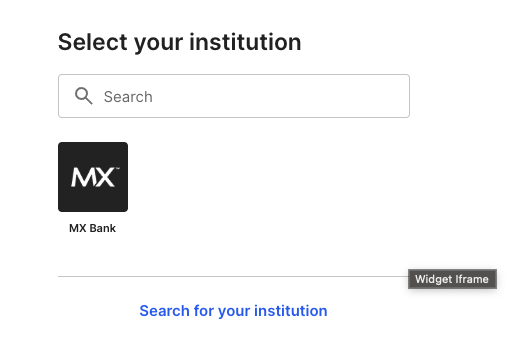
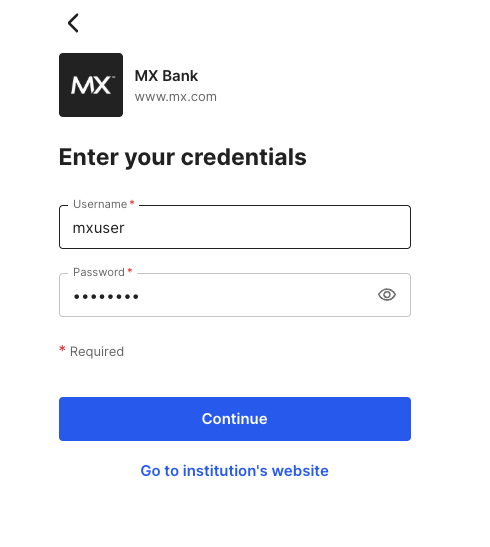
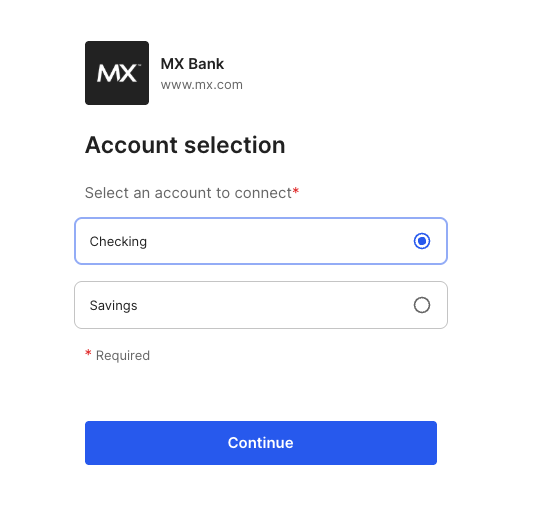
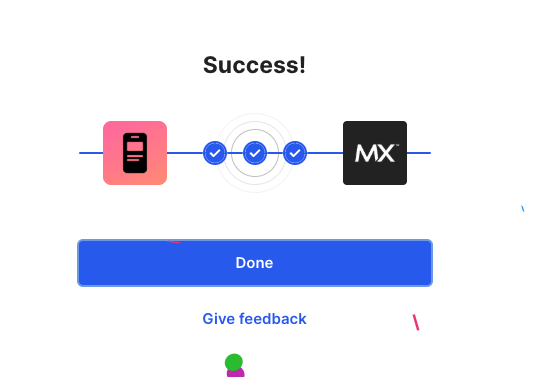
Open the widget_url in a redirect or an iframe. The Customer sees these screens:
1. Select the bank.
The Customer searches for their bank.
In Sandbox, search for MX Bank. Don't choose Connect with account numbers
2. Sign in.
The Customer enters their bank credentials.
In Sandbox, use mxuser and any password.
3. Select the account.
For example, Checking or Savings.
4. Finish.
The widget shows Success, and the connection is CONNECTED.
If the Customer already linked a bank, the widget shows it first, with a Search more institutions button.
List the Linked Accounts
GET /api/v1/customers/{customer_uuid}/linked-bank-accounts
Get the Customer's linked accounts:
curl --location --request GET 'https://harbor-sandbox.owlpay.com/api/v1/customers/{{CUSTOMER_UUID}}/linked-bank-accounts' \
--header 'Accept: application/json' \
--header 'X-API-KEY: {{API_KEY}}'{
"data": [
{
"id": "clbacc_45b93a4affca4bc2818dc189264b6e07",
"name": "Checking",
"type": "CHECKING",
"last4_digits": "0685",
"institution_name": "mxbank",
"connection_status": "CONNECTED"
}
]
}id: the linked bank account's ID, starting withclbacc_. Send it aslinked_bank_account_idwhen you create an ACH Pull transfer.name: the account name.type:CHECKINGorSAVINGS.last4_digits: the last 4 digits of the account number.institution_name: the bank's name.connection_status: for exampleCONNECTED.
Get a Quote
POST /api/v2/transfers/quotes
Get a quote for the rate, the fees and the amount.
curl --location --request POST 'https://harbor-sandbox.owlpay.com/api/v2/transfers/quotes' \
--header 'Content-Type: application/json' \
--header 'Accept: application/json' \
--header 'X-API-KEY: {{API_KEY}}' \
--data-raw '{
    "on_behalf_of": "{{CUSTOMER_UUID}}",
    "source": {
        "amount": "100.00",
        "asset": "USD",
        "type": "individual",
        "country": "US"
    },
    "destination": {
        "asset": "USDC",
        "type": "individual",
        "chain": "stellar"
    }
}'
The response has a quote for each payment method. Pick the one where payment_method is ACH_PULL.
{
    "data": [
        {
            "id": "quote_f03AirZ3ZY...KBtFQfZtPDYv",
            "payment_method": "ACH_PULL",
            "source_amount": "100.00",
            "source_currency": "USD",
            "destination_amount": "100.000000",
            "destination_currency": "USDC",
            "destination_chain": "stellar",
            "exchange_rate": "1.00000000",
            "fees": [
                {
                    "type": "HARBOR_FEE",
                    "amount": "1.700000",
                    "currency": "USDC"
                }
            ],
            "quote_expire_date": "2026-03-21T09:30:00+00:00"
        }
    ]
}
Its id is the quote_id you need next.
Create the Transfer
POST /api/v2/transfers
Use the clbacc_ ID in source.payment_instrument.linked_bank_account_id and the quote_id:
curl --location --request POST 'https://harbor-sandbox.owlpay.com/api/v2/transfers' \
--header 'Content-Type: application/json' \
--header 'Accept: application/json' \
--header 'X-API-KEY: {{API_KEY}}' \
--header 'X-Idempotency-Key: {{IDEMPOTENCY_KEY}}' \
--data-raw '{
    "on_behalf_of": "{{CUSTOMER_UUID}}",
    "quote_id": "{{QUOTE_ID}}",
    "application_transfer_uuid": "{{YOUR_ORDER_ID}}",
    "source": {
        "payment_instrument": {
            "linked_bank_account_id": "clbacc_45b93a4affca4bc2818dc189264b6e07"
        }
    },
    "destination": {
        "beneficiary_info": {
            "...": "Fill according to quote requirements"
        },
        "payout_instrument": {
            "address": "0x1234567890abcdef1234567890abcdef12345678"
        },
        "transfer_purpose": "SALARY",
        "is_self_transfer": true
    }
}'
All of these are required:
on_behalf_of: the Customer's UUID.quote_id: the quote'sid.application_transfer_uuid: your order ID. Harbor also uses it to detect repeats.source.payment_instrument.linked_bank_account_id: theidof the linked bank account (clbacc_...). For ACH Pull only. For a debit card, uselinked_card_id.destination: where the USDC goes, with the payout address and beneficiary details.
Harbor returns 201 Created with the Transfer object, in pending_customer_transfer_start.
Approve the Payment
After the transfer is created, Harbor emails the account holder a "Payment Authorization Request". Harbor debits the account only after they approve.
- The link works for 24 hours. If the link expires, the transfer is
expired. If the account holder declines, it iscancelled.
Harbor sends this email in Production only.
Get One Linked Account
GET /api/v1/customers/{customer_uuid}/linked-bank-accounts/{linked_bank_account_id}
curl --location --request GET 'https://harbor-sandbox.owlpay.com/api/v1/customers/{{CUSTOMER_UUID}}/linked-bank-accounts/{{LINKED_BANK_ACCOUNT_ID}}' \
--header 'Accept: application/json' \
--header 'X-API-KEY: {{API_KEY}}'{
"data": {
"id": "clbacc_45b93a4affca4bc2818dc189264b6e07",
"name": "Checking",
"type": "CHECKING",
"last4_digits": "0685",
"institution_name": "mxbank",
"connection_status": "CONNECTED"
}
}Transfer Status
After you create the transfer, it moves through these statuses:
pending_customer_transfer_start: created, waiting for the account holder to approve.pending_customer_transfer_startwithsub_statusawaiting_settlement: approved, and Harbor waits for the bank to confirm the pull.pending_harbor: the bank confirmed the pull. Harbor waits for the funds to settle (T+2).pending_external: the USDC is sent to the blockchain.completed: done.
If the USDC goes to an internal wallet, the transfer is completed as soon as the bank confirms the pull, and the funds stay locked until they settle. See Settlement and Payment Lock Time.
A transfer can also be on_hold (compliance check), reject (the pull failed), expired (the approval link expired) or cancelled (the account holder declined).
Listen to the status webhooks. See Transfer Lifecycle.
Errors
Creating the transfer can fail with these errors:
| Status | Reason |
|---|---|
422 | The bank account's balance is too low for the transfer amount. |
422 | The Customer doesn't exist, hasn't completed bank compliance onboarding, or isn't eligible for the service. |
422 | The bank account is blocked. |
422 | The bank connection isn't CONNECTED. The Customer must reconnect the account. |
422 | The Customer can't start transfers, or the quote's source type doesn't match the Customer. |
400 | The quote has expired. |
400 | The amount is over a payment method limit: per transaction, daily, weekly or monthly. |
403 | Your Application isn't allowed to create transfers. Contact OwlPay Support. |
409 | Another transfer is being created for this Customer. Try again. |
Complete Flow Diagram
sequenceDiagram
    autonumber
    participant PSP as Your Application
    participant Harbor as Harbor API
    participant Bank as Bank / Institution
    participant User as Account Holder

    Note over PSP, User: Connect the bank account
    PSP->>Harbor: POST /customers/{uuid}/bank-connections/widget-url
    Harbor-->>PSP: {widget_url}
    PSP->>User: Redirect to widget
    User->>Bank: Authenticate & authorize in widget
    Bank-->>Harbor: Account linked
    Harbor->>Harbor: Sync account info

    Note over PSP, User: List the linked accounts
    PSP->>Harbor: GET /customers/{uuid}/linked-bank-accounts
    Harbor-->>PSP: [{id: "clbacc_...", name, type, ...}]

    Note over PSP, User: Get a quote
    PSP->>Harbor: POST /v2/transfers/quotes
    Harbor-->>PSP: [{payment_method: "ACH_PULL", id, ...}]

    Note over PSP, User: Create the transfer
    PSP->>Harbor: POST /v2/transfers (with clbacc_ ID + quote_id)
    Harbor->>Harbor: Validate account balance

    alt Insufficient balance
        Harbor-->>PSP: 422 Insufficient balance
    else Balance OK
        Harbor->>Bank: Create deposit order (ACH_PULL)
        Bank-->>Harbor: Order created
        Harbor-->>PSP: 201 Created (Transfer object)
        Harbor->>User: Email to approve the payment
        User-->>Harbor: Approve
    end
Notes
- Sandbox doesn't send emails. In Production, the account holder gets an approval email, and a confirmation with a receipt when the transfer completes. Tell your Customers to expect both.
- Harbor asks for approval by email because some banks don't ask the account holder themselves. The email warns them of the debit and keeps a record of their authorization, which helps in a chargeback.
Updated about 14 hours ago