
Link Debit Card
Fund on-ramp transfers by charging a linked U.S. debit card.
Debit Card lets a Customer fund an on-ramp transfer from a linked debit card. They bind it once, then use it for each transfer.
How It Works
From binding the card to the USDC payout:
- The Customer binds a card on a hosted page. Harbor saves it with an ID that starts with
card_. - You get a
DEBIT_CARDquote. - You create the transfer with the
card_ID and thequote_id. - Harbor emails the cardholder to approve the payment, then charges the card.
- When the funds clear (T+1), Harbor sends the USDC. See Settlement and Payment Lock Time.
Eligibility
Debit Card is for individual Customers in the US. Business Customers aren't supported. The card must be a Visa or Mastercard debit or prepaid card issued by a U.S. bank. Credit cards aren't supported. See Debit Card Support Coverage.
Before a Customer can bind a card:
- Your Application has the
DEBIT_CARDpayment method enabled. - The Customer has completed KYC verification (status:
VERIFIED). - The Customer has signed the customer agreement.
- The Customer is an individual in the US.
If a Customer doesn't meet these, binding returns 403.
Example: Debit Card
These steps bind a card, then use it to create a transfer.
Bind the Card
POST /api/v1/customers/{customer_uuid}/cards
Create a card for the Customer, and send them to its binding page.
curl --location --request POST 'https://harbor-sandbox.owlpay.com/api/v1/customers/{{CUSTOMER_UUID}}/cards' \
--header 'Content-Type: application/json' \
--header 'Accept: application/json' \
--header 'X-API-KEY: {{API_KEY}}' \
--data-raw '{
    "redirect_url": {
        "success": "https://yourapp.com/card/success",
        "failed": "https://yourapp.com/card/failed"
    }
}'
Both redirect_url fields are optional. A web link or an app deep link works for both:
redirect_url.success: where Harbor sends the Customer after the card is bound.redirect_url.failed: where Harbor sends the Customer if binding fails, for example for an invalid card number or an unsupported bank. If you don't set it, the Customer sees a default failure page.
{
    "data": {
        "uuid": "card_abc123",
        "object": "customer_card",
        "customer_uuid": "cus_1234567890",
        "card_type": "debit",
        "status": "pending",
        "last4_digits": null,
        "card_company": null,
        "expiration_month": null,
        "expiration_year": null,
        "pull_enabled": false,
        "push_enabled": false,
        "first_name": null,
        "last_name": null,
        "country_code": null,
        "issuer_country_code": null,
        "enabled": false,
        "restricted": false,
        "url": "https://owlti.ng/AbCdEfGh1234",
        "created_at": "2026-03-21T10:00:00+00:00",
        "updated_at": "2026-03-21T10:00:00+00:00"
    }
}
While the card is pending, url is the binding page. Open it in a redirect or an iframe. The link works for 7 days. When the Customer finishes, the card becomes active and enabled, and url becomes null.
The Customer sees these screens:
1. Open the binding page.
The Customer sees the card form.
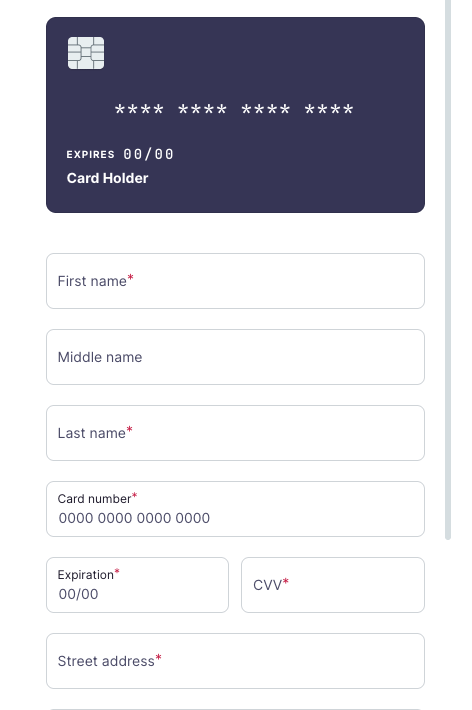
2. Enter the card.
The Customer enters their name, card number, expiry, CVV and billing address.
In Sandbox, use the card 4242424242424242, expiry 12/31, CVV 123 and postal code 12345.
3. Register.
The Customer selects Register.
Harbor sends them to redirect_url.success.

More cards to test with:
| Mastercard (Debit) | VISA OCT (Prepaid) | VISA OCT (Debit) |
|---|---|---|
| 5102589999999905 | 4000289999999908 | 4007589999999904 |
| 5102589999999913 | 4000289999999916 | 4007589999999912 |
| 5102589999999921 | 4000289999999924 | 4007589999999920 |
| 5102589999999939 | 4000289999999932 | 4007589999999938 |
| 5102589999999947 | 4000289999999940 | 4007589999999946 |
| 5102589999999954 | 4000289999999957 | 4007589999999953 |
| 5102589999999962 | 4000289999999965 | 4007589999999961 |
| 5102589999999970 | 4000289999999973 | 4007589999999979 |
| 5102589999999988 | 4000289999999981 | 4007589999999987 |
| 5102589999999996 | 4000289999999999 | 4007589999999995 |
List the Cards
GET /api/v1/customers/{customer_uuid}/cards
Get the Customer's cards. Harbor syncs the latest card status first.
curl --location --request GET 'https://harbor-sandbox.owlpay.com/api/v1/customers/{{CUSTOMER_UUID}}/cards' \
--header 'Accept: application/json' \
--header 'X-API-KEY: {{API_KEY}}'{
"data": [
{
"uuid": "card_abc123",
"object": "customer_card",
"customer_uuid": "cus_1234567890",
"card_type": "debit",
"status": "active",
"last4_digits": "4242",
"card_company": "Visa",
"expiration_month": "12",
"expiration_year": "31",
"pull_enabled": true,
"enabled": true,
"restricted": false,
"url": null
}
]
}uuid: the card's ID, starting withcard_. Send it aslinked_card_idwhen you create a debit card transfer.card_type:debitorcredit.status:pending,active,expired,disabledorrestricted.last4_digits: the last 4 digits of the card number.card_company: the card network, for exampleVisaorMastercard.pull_enabled: whether the card supports pull (debit) transactions.enabledandrestricted: you can only use a card that isactive,enabledand notrestricted.
Get a Quote
POST /api/v2/transfers/quotes
Get a quote for the rate, the fees and the amount.
curl --location --request POST 'https://harbor-sandbox.owlpay.com/api/v2/transfers/quotes' \
--header 'Content-Type: application/json' \
--header 'Accept: application/json' \
--header 'X-API-KEY: {{API_KEY}}' \
--data-raw '{
    "on_behalf_of": "{{CUSTOMER_UUID}}",
    "source": {
        "amount": "100.00",
        "asset": "USD",
        "type": "individual",
        "country": "US"
    },
    "destination": {
        "asset": "USDC",
        "type": "individual",
        "chain": "stellar"
    }
}'
The response has a quote for each payment method. Pick the one where payment_method is DEBIT_CARD. Its id is the quote_id you need next. With on_behalf_of, the response also has the Customer's customer_limits, which you can show in your app. current_remaining is the most the Customer can spend right now.
{
    "data": [
        {
            "id": "quote_f03AirZ3ZY...KBtFQfZtPDYv",
            "payment_method": "DEBIT_CARD",
            "source_amount": "100.00",
            "source_currency": "USD",
            "destination_amount": "100.000000",
            "destination_currency": "USDC",
            "destination_chain": "stellar",
            "exchange_rate": "1.00000000",
            "fees": [
                {
                    "type": "HARBOR_FEE",
                    "amount": "1.700000",
                    "currency": "USDC"
                }
            ],
            "customer_limits": {
                "per_transaction_limit": "500.00",
                "daily_limit": "9999.00",
                "daily_remaining": "9999.00",
                "current_remaining": "500.00"
            },
            "quote_expire_date": "2026-03-21T09:30:00+00:00"
        }
    ]
}
Create the Transfer
POST /api/v2/transfers
Use the card_ ID in source.payment_instrument.linked_card_id and the quote_id:
curl --location --request POST 'https://harbor-sandbox.owlpay.com/api/v2/transfers' \
--header 'Content-Type: application/json' \
--header 'Accept: application/json' \
--header 'X-API-KEY: {{API_KEY}}' \
--header 'X-Idempotency-Key: {{IDEMPOTENCY_KEY}}' \
--data-raw '{
    "on_behalf_of": "{{CUSTOMER_UUID}}",
    "quote_id": "{{QUOTE_ID}}",
    "application_transfer_uuid": "{{YOUR_ORDER_ID}}",
    "source": {
        "payment_instrument": {
            "linked_card_id": "card_abc123"
        }
    },
    "destination": {
        "beneficiary_info": {
            "...": "Fill according to quote requirements"
        },
        "payout_instrument": {
            "address": "0x1234567890abcdef1234567890abcdef12345678"
        },
        "transfer_purpose": "SALARY",
        "is_self_transfer": true
    }
}'
All of these are required:
on_behalf_of: the Customer's UUID.quote_id: the quote'sid.application_transfer_uuid: your order ID. Harbor also uses it to detect repeats.source.payment_instrument.linked_card_id: theuuidof the card (card_...). For debit card only. For ACH Pull, uselinked_bank_account_id.destination: where the USDC goes, with the payout address and beneficiary details.
Harbor returns 201 Created with the Transfer object, in pending_customer_transfer_start.
Approve the Payment
After the transfer is created, Harbor emails the cardholder a "Payment Authorization Request". Harbor charges the card only after they approve.
- The link works for 24 hours. If the link expires, the transfer is
expired. If the cardholder declines, it iscancelled.
Harbor sends this email in Production only.
Transfer Status
After you create the transfer, it moves through these statuses:
pending_customer_transfer_start: created, waiting for the cardholder to approve.pending_customer_transfer_startwithsub_statusawaiting_settlement: approved, and Harbor waits for the bank to confirm the charge.pending_harbor: the bank confirmed the charge. Harbor waits for the funds to settle (T+1).pending_external: the USDC is sent to the blockchain.completed: done.
If the USDC goes to an internal wallet, the transfer is completed as soon as the bank confirms the charge, and the funds stay locked until they settle. See Settlement and Payment Lock Time.
A transfer can also be on_hold (compliance check), request_for_information, reject (the card was declined or the pull failed), expired (the approval link expired), cancelled or refunded.
Listen to the status webhooks. See Transfer Lifecycle.
Errors
Creating the transfer can fail with these errors:
| Status | Reason |
|---|---|
422 | The card doesn't exist, or doesn't belong to this Application. |
422 | The card isn't active or enabled, it's restricted, or it's blocked. |
422 | The card is a credit card. |
422 | The Customer doesn't exist, or can't start transfers. |
400 | The quote has expired. |
400 | The amount is over a payment method limit: per transaction, daily, weekly or monthly. |
403 | Your Application isn't allowed to create transfers. Contact OwlPay Support. |
409 | Another transfer is being created for this Customer. Try again. |
Complete Flow Diagram
sequenceDiagram
    autonumber
    participant PSP as Your Application
    participant Harbor as Harbor API
    participant User as Cardholder

    Note over PSP, User: Bind the card
    PSP->>Harbor: POST /customers/{uuid}/cards
    Harbor-->>PSP: {uuid: "card_...", url: "https://...", status: "pending"}
    PSP->>User: Redirect to the binding page
    User->>Harbor: Enter the card details
    Harbor->>Harbor: Sync card info

    Note over PSP, User: List the cards
    PSP->>Harbor: GET /customers/{uuid}/cards
    Harbor-->>PSP: [{uuid: "card_...", status: "active", last4_digits, ...}]

    Note over PSP, User: Get a quote
    PSP->>Harbor: POST /v2/transfers/quotes
    Harbor-->>PSP: [{payment_method: "DEBIT_CARD", id, ...}]

    Note over PSP, User: Create the transfer
    PSP->>Harbor: POST /v2/transfers (with card_ ID + quote_id)
    Harbor->>Harbor: Validate the card and limits

    alt Validation failed
        Harbor-->>PSP: 422 or 400 error
    else Validation OK
        Harbor-->>PSP: 201 Created (Transfer object)
        Harbor->>User: Email to approve the payment
        User-->>Harbor: Approve
    end
Notes
- Sandbox doesn't send emails. In Production, the cardholder gets an email to approve the payment, and a confirmation with a receipt when the transfer completes. Tell your Customers to expect both.
- A card can't be changed. If a card expires or is disabled or restricted, bind a new one with the same call. A Customer can have several cards.
Updated about 14 hours ago