
Pay First, Bind Later
Start an off-ramp to a U.S. debit card before you have the recipient's card details.
Pay First, Bind Later lets you create a debit card off-ramp transfer without the recipient's card. Harbor returns a card_binding_url, where the recipient adds their card. The payout starts once the funds have arrived and the card is added.
How It Works
- You get a quote for USDC to USD and use the
DEBIT_CARDoption. - You create the transfer without
destination.payout_instrument. - The response has two things to share:
- For the Customer: the deposit address in
transfer_instructions. - For the recipient: the
card_binding_url.
- For the Customer: the deposit address in
- The Customer sends the USDC, and the recipient adds their card. These can happen in either order.
- When both are done, Harbor pays out the USD to the card.
sequenceDiagram
    participant App as Your App
    participant Harbor
    participant Customer
    participant Recipient

    App->>Harbor: POST /api/v2/transfers/quotes
    Harbor-->>App: DEBIT_CARD quote
    App->>Harbor: POST /api/v2/transfers (no payout_instrument)
    Harbor-->>App: Transfer with transfer_instructions and card_binding_url
    App->>Customer: Deposit address and amount
    Customer->>Harbor: Sends USDC on-chain
    App->>Recipient: card_binding_url
    Recipient->>Harbor: Adds debit card on the hosted page
    Harbor->>Recipient: Pays out USD to the card
Example: Debit Card Payout
This example sends 100 USD to Jane Doe's debit card, paid with 100 USDC on the Ethereum network.
Get a Quote
Quote USDC to USD on behalf of the Customer:
curl --location --request POST 'https://harbor-sandbox.owlpay.com/api/v2/transfers/quotes' \
--header 'Content-Type: application/json' \
--header 'Accept: application/json' \
--header 'X-API-KEY: {{API_KEY}}' \
--data-raw '{
    "on_behalf_of": "{{CUSTOMER_UUID}}",
    "source": {
        "country": "US",
        "chain": "ethereum",
        "asset": "USDC",
        "amount": 100,
        "type": "individual"
    },
    "destination": {
        "country": "US",
        "asset": "USD",
        "type": "individual"
    }
}'
Use the quote with payment_method DEBIT_CARD. Save its id:
{
    "data": [
        {
            "id": "quote_AukvdlCwV4YJKSJh7sXylli9ixO4nQJJTCXMR6EZ",
            "payment_method": "DEBIT_CARD",
            "chain": "ethereum",
            "source_amount": "100.000000",
            "source_currency": "USDC",
            "destination_amount": "100.00",
            "destination_currency": "USD",
            "exchange_rate": "1.00000000",
            "quote_expire_date": "2026-10-07T04:32:23+00:00",
            "crypto_funds_settlement_expire_date": "2026-10-07T04:02:23+00:00",
            ...
        }
    ]
}
For all the quote fields, see Quotes.
Get the Requirements
curl --location --request GET 'https://harbor-sandbox.owlpay.com/api/v2/transfers/quotes/{{QUOTE_ID}}/requirements' \
--header 'Accept: application/json' \
--header 'X-API-KEY: {{API_KEY}}'
For a debit card payout, payout_instrument.linked_card_id is optional. Leave out payout_instrument to get a card_binding_url. See Transfer Requirements.
Create the Transfer
Send the Customer's wallet in source and leave out destination.payout_instrument:
curl --location --request POST 'https://harbor-sandbox.owlpay.com/api/v2/transfers' \
--header 'Content-Type: application/json' \
--header 'Accept: application/json' \
--header 'X-API-KEY: {{API_KEY}}' \
--header 'X-Idempotency-Key: {{Idempotency-Key}}' \
--data-raw '{
    "quote_id": "{{QUOTE_ID}}",
    "on_behalf_of": "{{CUSTOMER_UUID}}",
    "application_transfer_uuid": "{{APPLICATION_TRANSFER_UUID}}",
    "source": {
        "payment_instrument": {
            "address": "0xae13f53f0F85FF0A2245F3c7b6bfaB18e4117b55"
        }
    },
    "destination": {
        "beneficiary_info": {
            "beneficiary_name": "Jane Doe",
            "beneficiary_address": {
                "street": "123 Main St",
                "city": "Los Angeles",
                "state_province": "CA",
                "postal_code": "90001",
                "country": "US"
            }
        },
        "transfer_purpose": "FAMILY_MAINTENANCE",
        "is_self_transfer": false
    }
}'{
"data": {
"uuid": "transfer_ySbVOuFSiOKgXnHXNWYCTHUKytKiAwArQFREtaAM",
"object": "transfer",
"status": "pending_customer_transfer_start",
"type": "off-ramp",
"source_received": false,
"source": {
"chain": "ethereum",
"payment_instrument": {
"address": "0xae13f53f0F85FF0A2245F3c7b6bfaB18e4117b55",
"chain": "ethereum"
},
"asset": "USDC",
"amount": "100.00000000"
},
"destination": {
"asset": "USD",
"amount": "100.00000000",
"payout_instrument": [],
"is_self_transfer": false,
"transfer_purpose": "FAMILY_MAINTENANCE"
},
"transfer_instructions": {
"instruction_chain": "ethereum",
"instruction_address": "0x1c8d33d77628c709cfa262f992545960843600cb",
"instruction_memo": null
},
"card_binding_url": "https://owlti.ng/SAtEgbgfWJITkWrgi2xEEudZsspXI8aL",
"crypto_pay_in_expired_at": "2026-10-07T03:52:23+00:00",
...
}
}Send the Funds
The Customer sends USDC to the address in transfer_instructions:
- Amount:
source.amount, here 100 USDC. - Chain and address:
instruction_chainandinstruction_address. - Deadline: before
crypto_pay_in_expired_at. After that, the transfer expires.
The deposit must come from the wallet in source.payment_instrument.
Add the Card
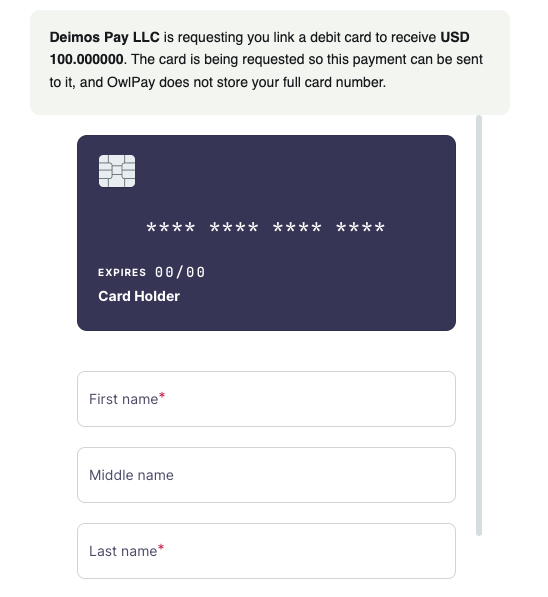
Share the card_binding_url with the recipient. The page shows the amount they will receive. The recipient enters their debit card details on the page, and the card data never reaches your servers.
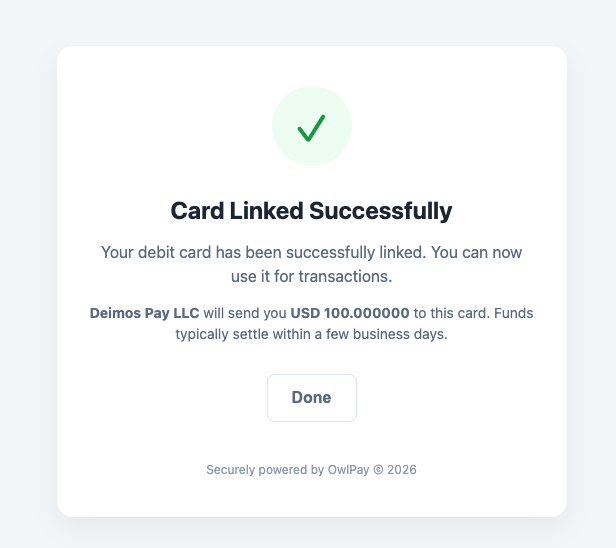
When the card is added, the page confirms it:
Follow the Transfer
The transfer moves through these statuses:
pending_customer_transfer_start: waiting for the Customer's USDC.pending_external: the deposit was seen on-chain and is being confirmed.pending_card_binding: the USDC arrived, and Harbor is waiting for the recipient's card.pending_harbor: the card was added, and Harbor is paying out.completed: the USD was sent to the card.
If the recipient adds the card before the USDC arrives, the transfer goes from pending_external to pending_harbor.
Follow the status by retrieving the transfer or with webhooks. See Transfer Lifecycle.
Reissue the Card Binding Link
The card_binding_url is valid for 7 days. To get a new link, call:
curl --location --request POST 'https://harbor-sandbox.owlpay.com/api/v2/transfers/{{TRANSFER_UUID}}/card-binding/reissue' \
--header 'Accept: application/json' \
--header 'X-API-KEY: {{API_KEY}}'{
"data": {
"card_binding_url": "https://owlti.ng/ZbtqU79dckAfraPQcLyzvcbCA5h64NoJ"
}
}The transfer then returns the new link in card_binding_url. After the card is added, this call returns This order is not awaiting card binding.
Notes
- Your application needs the
DEBIT_CARDpayment method enabled for US to USD off-ramp. - The sender can be an individual or a business. The recipient, who owns the card, must be an individual.
- If you already have the recipient's card, send it in
destination.payout_instrument.linked_card_id. The transfer pays out without acard_binding_url. See Link Debit Card. - The
card_binding_urlis valid for 7 days. To get a new one, see Reissue the Card Binding Link. The USDC must arrive beforecrypto_pay_in_expired_at, or the transfer expires. - To test in Sandbox, claim testnet USDC with the Testnet Faucet and send it to
instruction_address, because the deposit can't be simulated. Add the card with a VISA OCT test card from Link Debit Card, then use Simulate Transfer Status to complete the transfer.
Updated about 14 hours ago