
Off-Ramp (Withdrawal)
Convert USDC to fiat and send it to a bank account.
An off-ramp converts stablecoins to fiat. The Customer sends USDC, and Harbor pays out fiat to the recipient's bank account or card.
For the countries, currencies and payment methods, see Off-Ramp Coverage.
How It Works
- You get a quote for USDC to fiat. It returns an option for each payment method available on the route.
- You create the transfer with the Customer's wallet and the recipient's bank account.
- The response has
transfer_instructions: the address the Customer sends the USDC to. - The Customer sends the USDC from the wallet in the transfer.
- When the USDC arrives, Harbor pays out the fiat to the recipient.
sequenceDiagram
    participant App as Your App
    participant Harbor
    participant Customer
    participant Bank as Recipient's Bank

    App->>Harbor: POST /api/v2/transfers/quotes
    Harbor-->>App: Quotes, one per payment method
    App->>Harbor: GET /api/v2/transfers/quotes/{quote_id}/requirements
    Harbor-->>App: Transfer requirements
    App->>Harbor: POST /api/v2/transfers
    Harbor-->>App: Transfer with transfer_instructions
    Customer->>Harbor: Sends USDC to instruction_address
    Harbor->>Bank: Pays out the fiat
Example: International Wire to Hong Kong
This example sends 100 USD to Chan Tai Man's bank account in Hong Kong, paid with 100 USDC on the Ethereum network.
Get a Quote
Quote USDC to USD on behalf of the Customer:
curl --location --request POST 'https://harbor-sandbox.owlpay.com/api/v2/transfers/quotes' \
--header 'Content-Type: application/json' \
--header 'Accept: application/json' \
--header 'X-API-KEY: {{API_KEY}}' \
--data-raw '{
    "on_behalf_of": "{{CUSTOMER_UUID}}",
    "source": {
        "country": "US",
        "chain": "ethereum",
        "asset": "USDC",
        "amount": 100,
        "type": "individual"
    },
    "destination": {
        "country": "HK",
        "asset": "USD",
        "type": "individual"
    }
}'
The response returns a quote for each payment method available on the route. For this example, we use the WIRE quote. Save its id:
{
    "data": [
        ...,
        {
            "id": "quote_tmd1fjPpZ0QeHKTTqu76zOluZ4cB42GuhalZwweU",
            "payment_method": "WIRE",
            "payment_method_label": "International Wire",
            "chain": "ethereum",
            "source_amount": "100.000000",
            "source_currency": "USDC",
            "destination_amount": "100.00",
            "destination_currency": "USD",
            "exchange_rate": "1.00000000",
            "fiat_settlement_time_min": 1,
            "fiat_settlement_time_max": 3,
            "fiat_settlement_time_unit": "DAYS",
            "quote_expire_date": "2026-10-07T06:06:10+00:00",
            "crypto_funds_settlement_expire_date": "2026-10-07T05:36:10+00:00",
            ...
        }
    ]
}
For all the quote fields, see Quotes.
Get the Requirements
curl --location --request GET 'https://harbor-sandbox.owlpay.com/api/v2/transfers/quotes/{{QUOTE_ID}}/requirements' \
--header 'Accept: application/json' \
--header 'X-API-KEY: {{API_KEY}}'
For an international wire, the requirements ask for:
source.payment_instrument: the Customer's wallet, as anaddressor a Harbor walletwallet_uuid.beneficiary_info: the recipient's name and address.payout_instrument: the bank account:account_holder_name,bank_name,account_numberandswift_code.transfer_purposeandis_self_transfer.
The fields change by route, so always build your request from the requirements. See Transfer Requirements.
Create the Transfer
curl --location --request POST 'https://harbor-sandbox.owlpay.com/api/v2/transfers' \
--header 'Content-Type: application/json' \
--header 'Accept: application/json' \
--header 'X-API-KEY: {{API_KEY}}' \
--header 'X-Idempotency-Key: {{Idempotency-Key}}' \
--data-raw '{
    "quote_id": "{{QUOTE_ID}}",
    "on_behalf_of": "{{CUSTOMER_UUID}}",
    "application_transfer_uuid": "{{APPLICATION_TRANSFER_UUID}}",
    "source": {
        "payment_instrument": {
            "address": "0xae13f53f0F85FF0A2245F3c7b6bfaB18e4117b55"
        }
    },
    "destination": {
        "beneficiary_info": {
            "beneficiary_name": "Chan Tai Man",
            "beneficiary_address": {
                "street": "1 Queen'\''s Road Central",
                "city": "Hong Kong",
                "country": "HK"
            }
        },
        "payout_instrument": {
            "account_holder_name": "Chan Tai Man",
            "bank_name": "The Hongkong and Shanghai Banking Corporation Limited",
            "account_number": "123456789012",
            "swift_code": "HSBCHKHH"
        },
        "transfer_purpose": "FAMILY_MAINTENANCE",
        "is_self_transfer": false
    }
}'{
"data": {
"uuid": "transfer_cZm1GY2BaNFY6UPx9gyk83DneEUlpyC2cVFf1Euc",
"object": "transfer",
"status": "pending_customer_transfer_start",
"sub_status": null,
"type": "off-ramp",
"settlement_strategy": "immediate",
"source_received": false,
"refund_address": null,
"on_behalf_of": "cus_2XxcIyUQbPNzMAdyJ7NFjolt8t5zBEvqr402fjqK",
"source": {
"chain": "ethereum",
"payment_instrument": {
"address": "0xae13f53f0F85FF0A2245F3c7b6bfaB18e4117b55",
"chain": "ethereum",
"wallet_address": "0xae13f53f0F85FF0A2245F3c7b6bfaB18e4117b55"
},
"asset": "USDC",
"amount": "100.00000000"
},
"destination": {
"asset": "USD",
"amount": "100.00000000",
"payout_instrument": {
"account_holder_name": "Chan Tai Man",
"bank_name": "The Hongkong and Shanghai Banking Corporation Limited",
"account_number": "123456789012",
"swift_code": "HSBCHKHH"
},
"is_self_transfer": false,
"transfer_purpose": "FAMILY_MAINTENANCE"
},
"application_transfer_uuid": "order-1002",
"transfer_instructions": {
"instruction_chain": "ethereum",
"instruction_address": "0x8955416906c44f1c64cc4676368a375b76438327",
"instruction_memo": null
},
"commission": {
"percentage": "0",
"amount": "0"
},
"fees": [
{
"type": "HARBOR_FEE",
"amount": "1.700000",
"currency": "USDC",
"charge_from": "OwlPay Harbor",
"payer": "Your Company LLC"
},
{
"type": "COMMISSION_FEE",
"amount": "0.000000",
"currency": "USDC",
"charge_from": "Your Company LLC",
"payer": "customer"
}
],
"receipt": {
"initial_asset": "USDC",
"initial_amount": "100.00000000",
"commission_fee": "0.00000000",
"harbor_fee": "1.70",
"final_asset": "USD",
"final_amount": "100.00000000",
"exchange_rate": "1.00000000",
"tracking_number": null,
"tracking_number_status": null
},
"meta_data": null,
"crypto_pay_in_expired_at": "2026-10-07T05:26:10+00:00",
"created_at": "2026-10-07T05:06:11+00:00",
"updated_at": "2026-10-07T05:06:12+00:00"
}
}The transfer starts as pending_customer_transfer_start: Harbor is waiting for the Customer's USDC.
Send the Funds
The Customer sends USDC to the address in transfer_instructions:
- Amount:
source.amount, here 100 USDC. - Chain and address:
instruction_chainandinstruction_address. Ifinstruction_memoisn'tnull, include it. - From: the wallet in
source.payment_instrument. - Deadline: before
crypto_pay_in_expired_at. After that, the transfer expires.
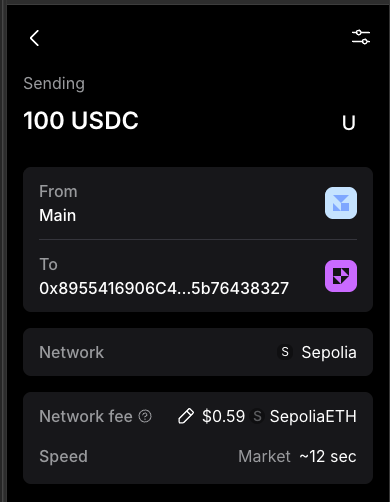
metamask-send-usdc
When the USDC arrives, the transfer moves to pending_harbor, and Harbor pays out the fiat. When the payout is sent, the transfer moves to completed. Follow the status by retrieving the transfer or with webhooks. See Transfer Lifecycle.
Confirm the Payout
When the transfer is completed, the payout was sent to the recipient's bank. The transfer's receipt has the payment reference:
{
    "data": {
        "uuid": "transfer_cZm1GY2BaNFY6UPx9gyk83DneEUlpyC2cVFf1Euc",
        "status": "completed",
        ...,
        "receipt": {
            ...,
            "final_asset": "USD",
            "final_amount": "10395.00000000",
            "tracking_number": "3f6c1a2e-8b4d-4c7a-9e51-2d0b7a6f4c18",
            "tracking_number_status": "payment_credited_to_beneficiary"
        }
    }
}{
"data": {
"uuid": "transfer_cZm1GY2BaNFY6UPx9gyk83DneEUlpyC2cVFf1Euc",
"status": "completed",
...,
"receipt": {
...,
"final_asset": "MXN",
"final_amount": "1750.00000000",
"tracking_number": "20260623ALFRED3668093",
"tracking_number_status": null
}
}
}tracking_number: the payment network's reference for the payout. For a USD SWIFT wire, it's the SWIFT UETR, a UUID. For SPEI in Mexico, it's the clave de rastreo, such as20260623ALFRED3668093. The recipient's bank can use it to find the payment. It'snulluntil the payout is sent.tracking_number_status: for USD SWIFT wires only, whether the wire reached the recipient:payment_in_progress,payment_credited_to_beneficiaryorpayment_has_been_rejected. For other payment methods, such as SPEI, it's alwaysnull.
The transfer.status.completed webhook has the same receipt.
Refunds
If an off-ramp transfer fails after Harbor receives the stablecoin, the funds can be refunded. Set refund_address when you create the transfer, so the refund destination is known in advance:
{
    "quote_id": "{{QUOTE_ID}}",
    "on_behalf_of": "{{CUSTOMER_UUID}}",
    "application_transfer_uuid": "{{APPLICATION_TRANSFER_UUID}}",
    "source": {
        "payment_instrument": {
            "address": "0xae13f53f0F85FF0A2245F3c7b6bfaB18e4117b55"
        }
    },
    "destination": { "..." },
    "refund_address": "0xae13f53f0F85FF0A2245F3c7b6bfaB18e4117b55"
}- The address must be on the quote's source blockchain. The refund is sent in the same stablecoin.
- Harbor checks the address when you create the transfer. If it isn't a valid address for that blockchain, the request returns
422with error code2005. refund_addresscan't be changed through the API after the transfer is created. To use a different address, contact OwlPay Support.- Setting
refund_addressdoesn't start a refund. OwlPay reviews failed transfers and sends the refund. - Without
refund_address, the funds aren't sent back to the source address. Harbor holds them until you give OwlPay Support a refund address. - The full amount received is refunded. No network fee is deducted.
When the full amount is refunded, the transfer moves to refunded and Harbor sends the transfer.status.refunded webhook. To see the refund details, call GET /api/v2/transfers/{transfer_uuid}/refunds. Each refund has its amount, currency, chain, address and status. The transaction hash is in tracking_number.
Notes
- In Sandbox, you can't simulate the USDC deposit for off-ramp transfers. Claim testnet USDC to your own test wallet, such as MetaMask, with the Testnet Faucet. Then send it from that wallet to
instruction_address. After the USDC arrives, move the transfer tocompletedwith Simulate Transfer Status. - To pay out to a debit card before you have the card details, see Pay First, Bind Later.
- To pay out in the recipient's currency, such as HKD, see Transfer to Local Currency.
- In Sandbox, payouts are simulated:
tracking_numberis a placeholder such asSIMULATED_COMPLETED_YTJTEMSIZ0. A real payment reference is only shown in Production. - Overfunded: the transfer goes ahead and pays out the quoted amount only. The extra isn't refunded automatically. Contact OwlPay Support.
- Underfunded: the transfer waits in
pending_customer_transfer_start. Send the rest to the same address to continue. If it expires, contact OwlPay Support for a refund.
Updated about 14 hours ago