
Wallet
This guide explains how to integrate the Wallet API via the OwlPay Harbor API, enabling your application to create and manage blockchain wallets for receiving and sending crypto assets.
The Wallet API is currently available only to Applications registered as US-based companies. Your business operating location and company registered address must be located in a state where OwlPay holds a Money Transmitter License (MTL). See the full list of licensed states at Licenses and Disclosures.
Prerequisites
- Your Application has been granted Wallet API access (
is_allow_access_wallet_api = true) - You have a valid
X-API-KEYfor authentication
Overview
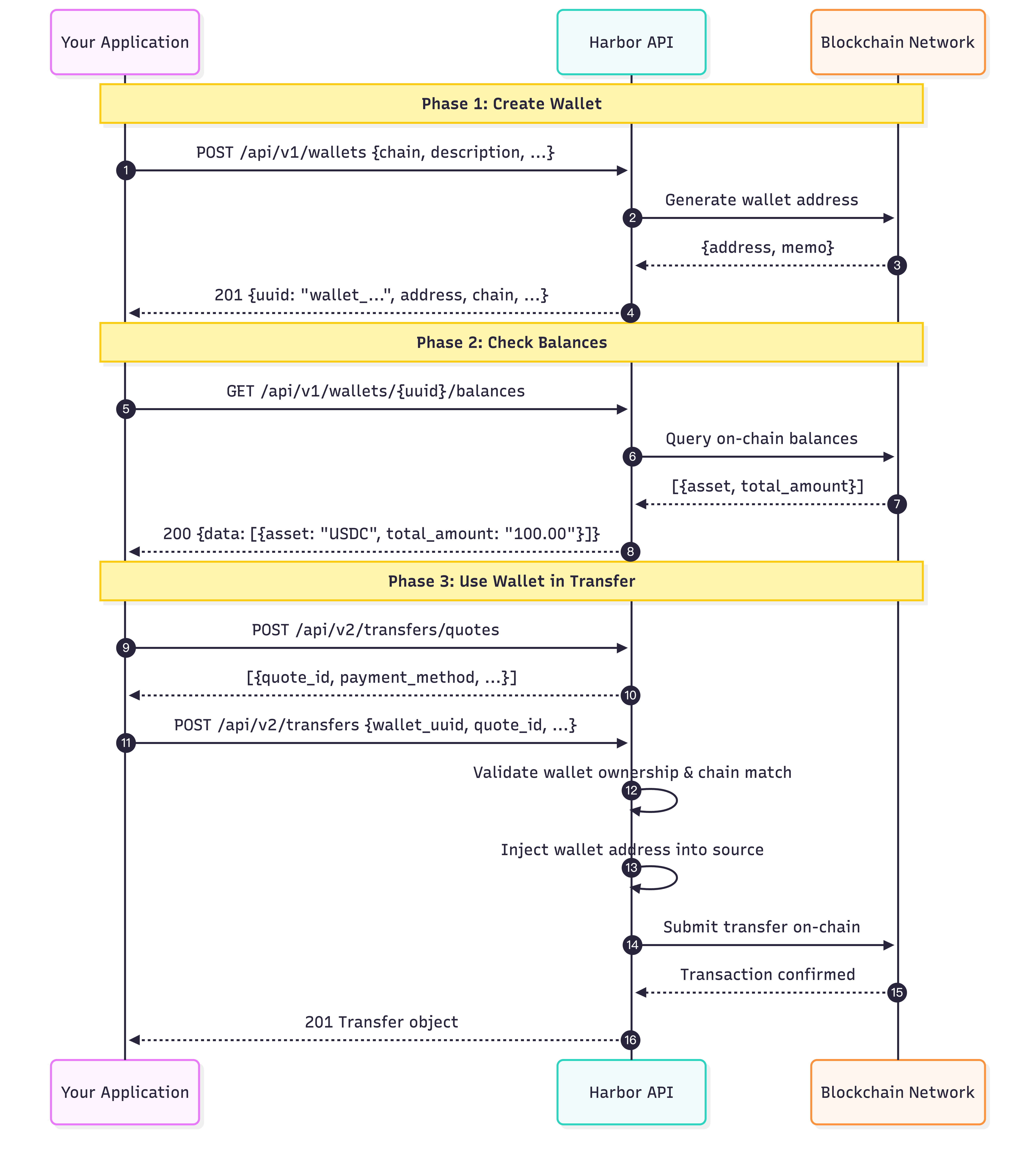
1. Create Wallet    → Create a blockchain wallet on a supported chain
2. List Wallets     → Retrieve all wallets under your application
3. Query Balances   → Check asset balances of a wallet
4. Query Records    → View on-chain transaction records
5. Use in Transfers → Reference wallet_uuid when creating transfers
Supported Chains
| Chain | Value | Mainnet | Sandbox (Testnet) |
|---|---|---|---|
| Ethereum | ethereum | Ethereum Mainnet | Sepolia |
| Arbitrum | arbitrum | Arbitrum One | Arbitrum Sepolia |
| Polygon | polygon | Polygon Mainnet | Amoy |
| Avalanche | avalanche | Avalanche C-Chain | Fuji |
| Optimism | optimism | OP Mainnet | OP Sepolia |
| Stellar | stellar | Public Network | Test Network |
| Solana | solana | Mainnet | Devnet |
Sandbox Note
When using the Harbor Sandbox environment (harbor-sandbox.owlpay.com), the system automatically operates on the respective Testnet specified in the table above. Addresses generated in Sandbox are only valid on these test networks.
Step 1: Create a Wallet
Create a new blockchain wallet on a specified chain. The system will automatically generate a wallet address.
Request
curl --location --request POST 'https://harbor-sandbox.owlpay.com/api/v1/wallets' \
--header 'Content-Type: application/json' \
--header 'Accept: application/json' \
--header 'X-API-KEY: {{API_KEY}}' \
--data-raw '{
    "chain": "ethereum",
    "description": "Customer payout wallet",
    "application_reference_id": "my-customer-001"
}'| Parameter | Type | Required | Description |
|---|---|---|---|
chain | string | Yes | Blockchain chain. Must be one of: ethereum, arbitrum, polygon, avalanche, optimism, stellar, solana |
description | string | No | Human-readable description (max 255 chars) |
application_reference_id | string | No | Your own system's unique identifier for this wallet, used to map the wallet back to a record in your system (max 255 chars, unique per application) |
meta_data | object | No | Optional metadata |
Response (201 Created)
{
    "data": {
        "uuid": "wallet_a1b2c3d4e5f6a1b2c3d4e5f6a1b2c3d4",
        "chain": "ethereum",
        "address": "0x1234567890abcdef1234567890abcdef12345678",
        "memo": null,
        "description": "Customer payout wallet",
        "application_reference_id": "my-customer-001",
        "meta_data": null,
        "created_at": "2026-03-21T08:00:00+00:00"
    }
}| Field | Description |
|---|---|
uuid | Wallet unique identifier, prefixed with wallet_. Use this ID when creating transfers |
chain | Blockchain chain |
address | Generated blockchain address |
memo | Memo/tag (applicable for chains like Stellar) |
description | Human-readable description |
application_reference_id | Your own system's identifier, for mapping this wallet to a record in your system |
meta_data | Additional metadata |
created_at | ISO 8601 creation timestamp |
Step 2: List Wallets
Retrieve all wallets under your application, with optional filtering by chain.
Request
curl --location --request GET 'https://harbor-sandbox.owlpay.com/api/v1/wallets?chain=ethereum&page=1' \
--header 'Accept: application/json' \
--header 'X-API-KEY: {{API_KEY}}'| Parameter | Type | Required | Description |
|---|---|---|---|
chain | string | No | Filter by blockchain chain |
page | integer | No | Page number for pagination |
per_page | integer | No | Number of items per page |
Response (200)
{
    "data": [
        {
            "uuid": "wallet_a1b2c3d4e5f6a1b2c3d4e5f6a1b2c3d4",
            "chain": "ethereum",
            "address": "0x1234567890abcdef1234567890abcdef12345678",
            "memo": null,
            "description": "Customer payout wallet",
            "application_reference_id": "my-customer-001",
            "meta_data": null,
            "created_at": "2026-03-21T08:00:00+00:00"
        }
    ],
    "links": {
        "first": "https://harbor-sandbox.owlpay.com/api/v1/wallets?page=1",
        "last": "https://harbor-sandbox.owlpay.com/api/v1/wallets?page=1",
        "prev": null,
        "next": null
    },
    "meta": {
        "current_page": 1,
        "from": 1,
        "last_page": 1,
        "path": "https://harbor-sandbox.owlpay.com/api/v1/wallets",
        "per_page": 15,
        "to": 1,
        "total": 1
    }
}
To retrieve a single wallet, use:
GET /api/v1/wallets/{wallet_uuid}
Step 3: Query Wallet Balances
Check the asset balances of a specific wallet.
Request
curl --location --request GET 'https://harbor-sandbox.owlpay.com/api/v1/wallets/{{WALLET_UUID}}/balances' \
--header 'Accept: application/json' \
--header 'X-API-KEY: {{API_KEY}}'
Response (200)
{
    "data": [
        {
            "asset": "USDC",
            "total_amount": "100.000000"
        },
        {
            "asset": "ETH",
            "total_amount": "0.500000"
        }
    ]
}
Step 4: Query Wallet Transaction Records
View on-chain transaction records for a specific wallet.
Request
curl --location --request GET 'https://harbor-sandbox.owlpay.com/api/v1/wallets/{{WALLET_UUID}}/records' \
--header 'Accept: application/json' \
--header 'X-API-KEY: {{API_KEY}}'
Response (200)
{
    "data": [
        {
            "id": "rec_xxxxxxxxxxxxxxxxxxxx",
            "type": "deposit",
            "amount": "50.000000",
            "token_symbol": "USDC",
            "from_address": "0xabcdefabcdefabcdefabcdefabcdefabcdefabcd",
            "to_address": "0x1234567890abcdef1234567890abcdef12345678",
            "tx_hash": "0xabc123def456...",
            "chain": "ethereum",
            "created_at": "2026-03-21T08:30:00+00:00"
        }
    ]
}
Step 5: Update a Wallet
Update the description or reference ID of an existing wallet. Chain and address are immutable.
Request
curl --location --request PATCH 'https://harbor-sandbox.owlpay.com/api/v1/wallets/{{WALLET_UUID}}' \
--header 'Content-Type: application/json' \
--header 'Accept: application/json' \
--header 'X-API-KEY: {{API_KEY}}' \
--data-raw '{
    "description": "Updated description",
    "application_reference_id": "my-customer-002"
}'| Parameter | Type | Required | Description |
|---|---|---|---|
description | string | No | Updated description (max 255 chars) |
application_reference_id | string | No | Updated identifier in your system for this wallet (must be unique per application) |
Using Wallets in Transfers
When creating transfers via the Transfer v2 API (POST /api/v2/transfers), you can reference a wallet by its wallet_uuid instead of manually providing a blockchain address.
On-Ramp Transfer (Fiat → Crypto)
For on-ramp transfers, wallet_uuid is passed inside destination.payout_instrument to specify the destination wallet where the converted stablecoins should be minted or deposited:
curl --location --request POST 'https://harbor-sandbox.owlpay.com/api/v2/transfers' \
--header 'Content-Type: application/json' \
--header 'Accept: application/json' \
--header 'X-API-KEY: {{API_KEY}}' \
--header 'Idempotency-Key: {{IDEMPOTENCY_KEY}}' \
--data-raw '{
    "on_behalf_of": "{{CUSTOMER_UUID}}",
    "quote_id": "{{QUOTE_ID}}",
    "application_transfer_uuid": "{{YOUR_ORDER_ID}}",
    "source": {
        "payment_instrument": {
            "bank_account_id": "ba_xxxxxxxxxxxxxxxxxxxx"
        }
    },
    "destination": {
        "payout_instrument": {
            "wallet_uuid": "wallet_a1b2c3d4e5f6a1b2c3d4e5f6a1b2c3d4"
        },
        "transfer_purpose": "SALARY",
        "is_self_transfer": false
    }
}'
Note: When
wallet_uuidis provided, the system automatically injects the wallet'saddressintodestination.payout_instrument.address. You do not need to provide the address manually.
Off-Ramp Transfer (Crypto → Fiat)
Pass wallet_uuid in source.payment_instrument to specify which wallet to debit:
curl --location --request POST 'https://harbor-sandbox.owlpay.com/api/v2/transfers' \
--header 'Content-Type: application/json' \
--header 'Accept: application/json' \
--header 'X-API-KEY: {{API_KEY}}' \
--header 'Idempotency-Key: {{IDEMPOTENCY_KEY}}' \
--data-raw '{
    "on_behalf_of": "{{CUSTOMER_UUID}}",
    "quote_id": "{{QUOTE_ID}}",
    "application_transfer_uuid": "{{YOUR_ORDER_ID}}",
    "source": {
        "payment_instrument": {
            "wallet_uuid": "wallet_a1b2c3d4e5f6a1b2c3d4e5f6a1b2c3d4"
        }
    },
    "destination": {
        "beneficiary_info": {
            "...": "Fill according to quote requirements"
        },
        "payout_instrument": {
            "...": "Fill according to quote requirements"
        },
        "transfer_purpose": "SALARY",
        "is_self_transfer": false
    }
}'
Note: When
wallet_uuidis provided, the system automatically injects the wallet'saddressintosource.payment_instrument.address. You do not need to provide the address manually.
On-Chain Transfer (SWAP)
For on-chain swaps, wallet_uuid specifies the source wallet:
curl --location --request POST 'https://harbor-sandbox.owlpay.com/api/v2/transfers' \
--header 'Content-Type: application/json' \
--header 'Accept: application/json' \
--header 'X-API-KEY: {{API_KEY}}' \
--header 'Idempotency-Key: {{IDEMPOTENCY_KEY}}' \
--data-raw '{
    "on_behalf_of": "{{CUSTOMER_UUID}}",
    "quote_id": "{{QUOTE_ID}}",
    "application_transfer_uuid": "{{YOUR_ORDER_ID}}",
    "source": {
        "payment_instrument": {
            "wallet_uuid": "wallet_a1b2c3d4e5f6a1b2c3d4e5f6a1b2c3d4"
        }
    },
    "destination": {
        "payout_instrument": {
            "chain": "avalanche",
            "address": "0x97ebc3b79c99b8F3d4dEB4D237A9376f6185CA2c"
        },
        "transfer_purpose": "SALARY",
        "is_self_transfer": false
    }
}'
Validation Rules
| Error | Description |
|---|---|
| Wallet not found | The specified wallet does not exist or does not belong to this application |
| Chain mismatch | The wallet chain does not match the transfer's expected chain from the quote (source chain for OFF_RAMP/SWAP; destination chain for ON_RAMP) |
Complete Flow Diagram
Updated 11 days ago