
Getting Started
This guide provides an introduction to getting started with the Harbor API, including how to authenticate requests, create customers, link blockchain addresses or bank accounts, and make API calls with the required headers and parameters.
Role Definitions
- Harbor: Refers to us in this document.
- Application: Our integration partners.
- Customer: Typically the customers of an Application.
Due to compliance requirements, Harbor requires Applications to provide Customer KYC (Know Your Customer) information during integration. Alternatively, we provide a direct KYC link that enables customers to submit their information seamlessly.
You are also the payerIf you are a application that also wants to perform payments, please onboard yourself as a Customer and pass the parameters to
businessto get the KYB form.
Once a Customer submits their KYC data, the Application can refer to the following status flow diagram to understand the current review status. For a detailed explanation of each status, please refer to Status .
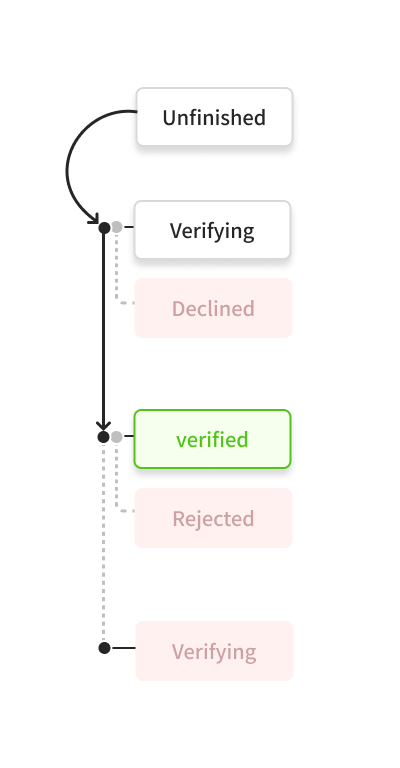
Customer KYC status change diagram
Step 1: Contact us to get Sandbox/Production information
To get started with OwlPay Harbor, please contact us to obtain sandbox and production access. We'll first provide you with sandbox credentials and an API_KEY for testing in your environment. Once you've completed the integration, we'll issue your PRODUCTION API_KEY, allowing you to go live 🎊.
Keep your API KEY safeIf you lose your PRODUCTION API_KEY, contact our customer service immediately. Ensure that your API_KEY is stored securely and never shared or exposed to insecure environments to prevent potential leaks.
Step 2: Register Your First Customer
You are now ready to start using Harbor’s core APIs.
The first step is to create a customer object that represents a user in your system.
When making this request, you need to set specific headers as shown in the example below. Most importantly, you must include the X-API-KEY header to authorize API access.
Agreement Link
- The Customer must agree to Harbor’s Agreements before we can proceed with the KYC/AML verification process.
curl --location --request POST 'https://harbor-sandbox.owlpay.com/api/v1/customers' \
--header 'Content-Type: application/json' \
--header 'Accept: application/json' \
--header 'X-API-KEY: {{API_KEY}}' \
--header 'X-Idempotency-Key: {{Idempotency-Key}}' \
--data-raw '{
  "type": "individual",
  "first_name": "John",
  "middle_name": "Michael",
  "last_name": "Doe",
  "email": "[email protected]",
  "phone_country_code": "US",
  "phone_number": "555-555-1234",
  "birth_date": "1988-04-15",
  "description": "A freelance writer who loves exploring national parks."
}'
The endpoint will return a response as shown below.
{
    "data": {
        "uuid": "{{customer_uuid}}",
        "object": "customer",
        "status": "deactivated",
        "state": "onboarding_needed",
        "type": "individual",
        "first_name": "John",
        "middle_name": "Michael",
        "last_name": "Doe",
        "email": "[email protected]",
        "phone_country_code": "US",
        "phone_number": "555-555-1234",
        "birth_date": "1988-04-15",
        "is_bank_account_linkable": false,
        "is_card_linkable": false,
        "description": "A freelance writer who loves exploring national parks.",
        "intermediary_fi_reference": null,
        "created_at": "2025-05-22T07:26:12+00:00",
        "updated_at": "2025-05-22T07:26:12+00:00",
        "has_signed_agreement": false,
        "agreement_link": "https://harbor-sandbox.owlpay.com/agreement_link",
        "kyc_link": "https://harbor-sandbox.owlpay.com/gokyc"
    }
}
Note: You will receive a customer ID (cus_xxx). If you need to add bank accounts or other related information, this ID is required to make requests to the corresponding endpoints.
Shareagreement_linkandkyc_linkto your customerCustomers must agree to the agreement and complete the KYC form, which must be approved before proceeding to the next step.
- In Sandbox mode, approval is automatic and usually takes 1–2 minutes.
- In Production mode, the review process may take 1–2 business days in some cases.
Step 3: Move your first dollar (do an on/off ramp transfer)
To start transferring funds (on-ramp or off-ramp) once your customer is approved, you can create quotes and initiate transactions.
For a complete step-by-step walkthrough of creating quotes and executing transactions—including USD and non-USD local currency settlements (such as HKD, SGD, MXN, BRL, and more)—please refer directly to our comprehensive transfer guide:
👉 Transfers with Local Currency (Off-ramp Outside the United States)
Congratulations! You have successfully registered your first customer and are ready to move assets globally 🚀.
Updated 14 days ago