
Link a Bank Account
This guide provides an overview of how users can securely link external bank accounts and use them as funding sources for transfers.
This functionality is integrated into the Transfer V2 workflow with automatic balance verification.
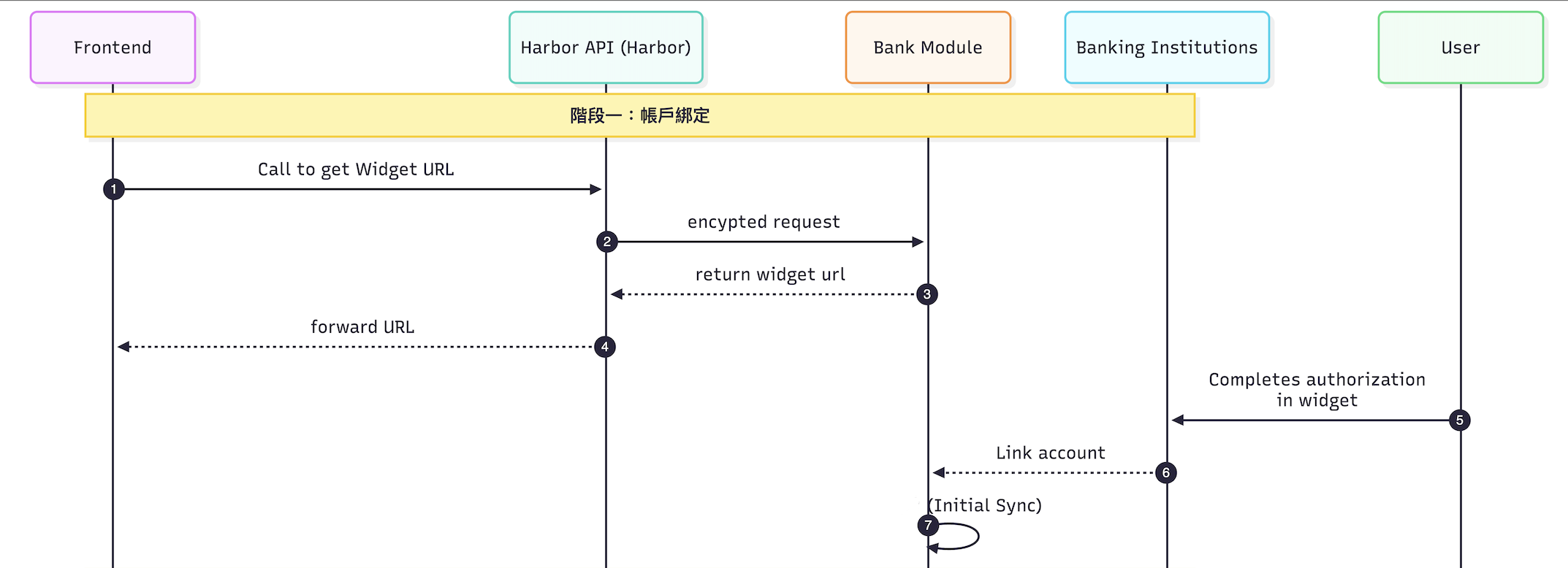
Account Linking Workflow
- Get Widget Link - Call our API to generate a secure authorization URL buy calling,
POST /applications/v1/bank-connections/widget-url. - User Authorizes Bank Access - The widget returned will redirect users to our UI where they will:
- Select their bank
- Authenticate with their bank credentials
- Grant permission to access account information
- Account Synchronization - Once authorization is completed:
- Our system automatically retrieves eligible bank accounts
- Only supported account types (e.g. Checking and Savings) are synchronized
- Each account is assigned a public, encoded identifier (
clbacc_…)
Now that the users bank account has succesfully been linked, the following actions are enabled:
- Retrieve Linked Accounts - By calling
GET /applications/v1/bank-connections/accountsyou can retrieve a list of successfully linked accounts. - Retrieve Account Details and Balance - For validation or display purposes, the application may retrieve details for a specific account. To do this you will call:
GET /applications/v1/bank-connections/accounts/{account_uuid} - Use Linked Account as Transfer Funding Source - A linked bank account can now be used as a funding source when creating a transfer.
- Now, when making a transfer with this account, the selected account’s
clbacc_… IDis passed assource_linked_bank_account_id - For ACH ON_RAMP transfers, the system automatically performs a balance check before creating the transfer
- If the available balance is insufficient, the request fails with a clear validation error
- Now, when making a transfer with this account, the selected account’s
The Diagram below shows the workflow of linking a users banks account.
Updated about 24 hours ago